


Itemtopia Home Inventory
3.5143.00 Reviews
App Specs
- Version
- 6.0.20
- Updated On
- License
- Free
- Downloads
- 50,000+
- Developer
- Itemtopia Inc.
- Categories
- House & Home
- Platform
- Android
Screenshots

 Analysis by AppCompare
I find a home inventory app most useful when it answers a practical question quickly: where did I put that, when did I buy it, or is it worth keeping a record of? Itemtopia Home Inventory is built around that kind of everyday tracking. It can help turn a vague mental list of possessions into something searchable and organized, though it works best when you add information steadily rather than trying to document your whole home in one sitting.
A good fit for an ongoing household routine
I’d consider this app if you manage a home with shared tools, appliances, hobby equipment, or belongings that move between rooms and storage spaces. It’s also useful for people who want a personal record of valuable possessions for planning or insurance conversations. That doesn’t mean an inventory replaces receipts, policy documents, or professional advice; I’d treat it as a convenient reference alongside those records.
It may be more app than you need if you own few things, rarely forget where they are, or prefer not to maintain digital lists. A notes app or a simple spreadsheet can be quicker for a handful of items. The difference is that a dedicated inventory gives each possession a more consistent place for details, images, and location information, while a general note tends to become a long block of text that is harder to keep tidy.
Start with the possessions you actually look for
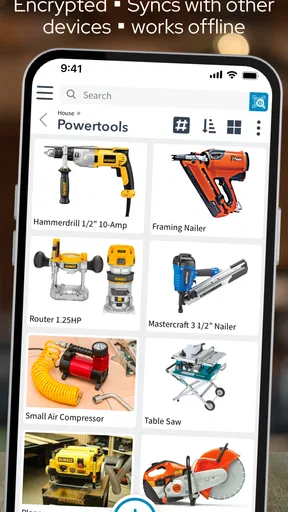
My advice is to begin with one problem area rather than cataloguing every cupboard. Pick a category that causes repeated friction—perhaps electronics, tools, or kitchen equipment—and record the items you most often need to locate or check. Add a photo and a useful location description, such as a room and a storage spot, instead of relying on a broad label like “upstairs.” That makes a later search more practical without turning setup into a weekend-long chore.
A realistic example: you lend a drill to a relative, then weeks later need to remember which one went out and whether it came back. A record with a recognizable photo, a home location, and a short note can make the situation easier to resolve than trying to reconstruct it from memory. The app is not a substitute for a conversation or a formal checkout system, but a consistent habit of updating item records can reduce the guesswork.
Build a repeatable record, not a perfect catalogue
For each item, I’d focus on details that will change a decision later: what it is, where it belongs, and any purchase or warranty information you want to keep close. A description should help distinguish similar things, not simply repeat the category. For example, “black travel charger with two ports” is more useful than “charger” when a household has several. If an item has documentation, keep the original record or document too; an inventory note is a handy pointer, not proof of purchase.
Photos are most useful when they identify an object or show its condition. I wouldn’t take a picture just to fill every record. For a collection of similar items, one clear image per individual object may be unnecessary; for a distinctive appliance or a valuable keepsake, a photo can make the entry much easier to recognize. This small judgement call keeps the catalogue useful instead of creating a pile of images that adds little information.
Worth Reading Before You Choose

EA SPORTS FC Mobile 26 Is a Bigger Football Game, but It Takes Time

Flipboard Shows What News Apps Must Do Beyond the Feed

Switching to Android Auto Means Rethinking Your Driving Routine

Google Calendar Makes a Crowded Week Easier to Manage

Ludo King Makes the Most of the Minutes Between Plans

Baby Panda World Brings Quick Play to Modern Phones, but Its Game Library Feels Busy
Using Itemtopia as a household tool
I use a household inventory most when a small, repeatable routine keeps it from becoming a one-time cataloguing project. In this section, I’ll focus on how to make Itemtopia useful for shared spaces and changing belongings, then turn to the settings and habits that help the records stay practical. A good starting point is to decide which household questions you want the inventory to answer first.
Getting Started: Simplicity at its Best
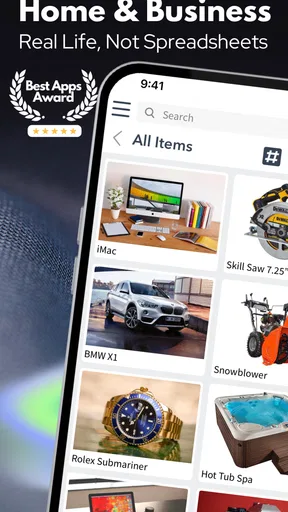
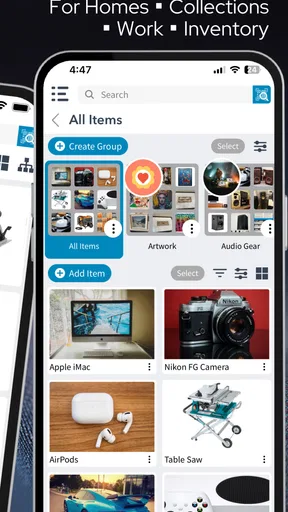
First things first, downloading Itemtopia Home Inventory was a breeze. Available on both Android and iOS, the app is just a quick tap away. Once you’re in, the clean and intuitive interface is a breath of fresh air. No clutter here—just straightforward options to add items, organize them into categories, and even upload photos. It’s like Marie Kondo designed an app, and I’m here for it.
Organizing Your World
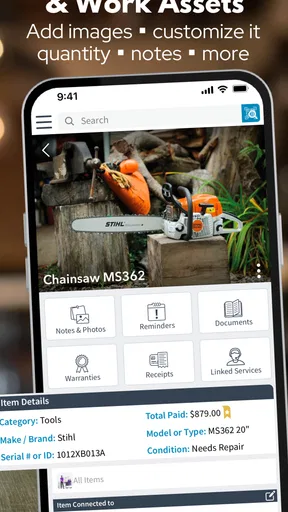
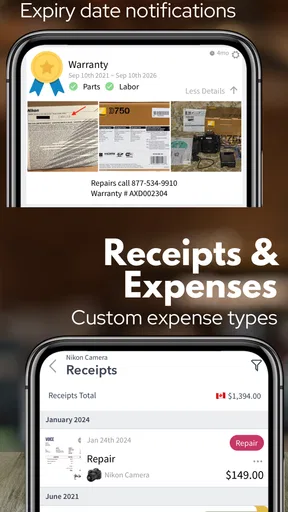
Itemtopia really shines when it comes to categorization. You can create custom categories for just about anything—tech gadgets, kitchenware, clothes, you name it. The app allows you to add detailed descriptions, purchase dates, and even warranty info. I found this especially handy for keeping track of my gadgets. No more rifling through old receipts to find out if my toaster is still under warranty!
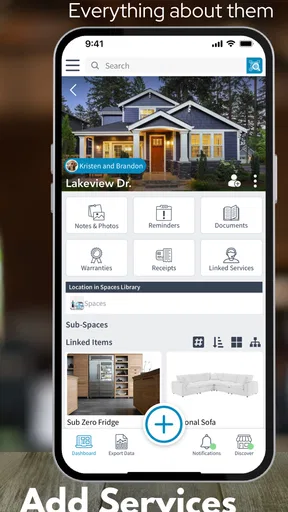
What’s cool is that you can also tag items with locations within your house. So, if you’re like me and occasionally forget where you stashed that specialty blender, Itemtopia’s got your back.
Visual Inventory
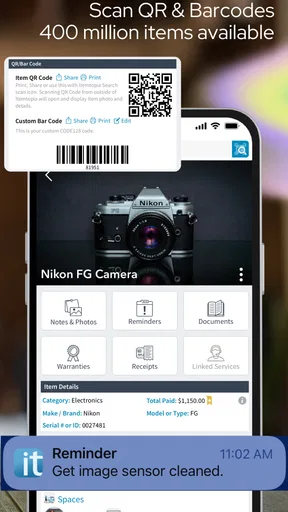
Being able to upload photos of each item is a fantastic feature. I mean, a picture is worth a thousand words, right? Whether it’s your grandma’s vintage necklace or that quirky lamp you picked up on vacation, having a visual reminder not only makes it easier to find but also adds a personal touch to your inventory.
I’d use photos selectively, especially when two possessions look alike or when a condition record may matter later. A clear view of a model label can also help distinguish one appliance from another, while a general room photo may be too vague to help. The trade-off is the time required to capture and maintain images, so I’d prioritize items that are hard to identify from a short description alone.
Security and Accessibility
Now, let’s talk security. We all want to make sure our data is safe. Itemtopia encrypts your information, which gives peace of mind knowing your inventory details aren’t just floating around the internet. Plus, the app is cloud-based, meaning you can access your inventory from any device. Lose your phone? No worries, your item list is safe and sound, ready for you to access from another gadget.
Because a home inventory can reveal what you own and where you keep it, I’d still be thoughtful about what I record and who can see it. Keep account access details private, and share only with people who genuinely need the information. Cloud access is convenient when you replace a phone or want to consult the list away from home, but it also makes careful account habits worthwhile. I’d check the available account and sharing settings before making a detailed catalogue that includes especially sensitive possessions.
The Sharing Economy
One of my favorite features is the ability to share your inventory with family members. This is super helpful for keeping everyone in the loop about what’s in the house. It’s like a digital family inventory library. Have a housemate who constantly borrows your stuff? Now they have no excuse to claim they didn’t know you owned that movie or tool!
Shared access is most useful when household members agree on a simple rule: update the record when an item changes location, leaves the home, or is replaced. Without that habit, people can end up trusting an old entry that no longer reflects reality. For a family, I’d begin by sharing only the categories that are useful to everyone, rather than assuming every personal possession needs to be part of a communal catalogue.
Setting Reminders
Itemtopia takes it a step further with reminder features. Need to renew a warranty or remember to service an appliance? Set a reminder, and the app will nudge you when the time comes. This little feature is a lifesaver for someone like me who tends to forget these things.
I’d reserve reminders for dates that lead to a clear action, such as checking a warranty or arranging maintenance, rather than setting one for every item. A reminder is only helpful if its date and purpose are understandable when it appears. For recurring household upkeep, I’d also keep any relevant service paperwork separately, so the inventory entry points me toward the task without becoming the only place I rely on.
Settings and habits that make the catalogue easier to trust
Itemtopia is free to download, with in-app purchases listed from $3.99 to $39.99 per item. The app is developed by Itemtopia Inc., and its home-management focus makes it different from a generic notes tool. I’d take a moment to review the choices available in the app before adding a large number of records, particularly anything related to account access, sharing, or reminders. A setting is only useful if it matches how your household actually works.
Its AI-powered positioning may catch the eye, but I would not build my workflow around assumptions about automation. The reliable value is in maintaining records you can use: clear categories, helpful descriptions, photos where they add meaning, and locations specific enough to guide you. If an automated suggestion is available, I’d treat it as a starting point and check the result rather than letting it define the inventory without review.
Version 6.0.18 runs on Android 7.0 or later, and the app is rated for Everyone. It has an average rating of 3.6 from 741 ratings, with 141 written reviews and over 50,000 installs. Those figures suggest it has found a real audience, while the middling average is a reminder that a home inventory is only as satisfying as the upkeep it asks of you. I’d try it with a small, useful set of possessions before deciding whether its approach suits your routine.
Where it differs from simpler alternatives
A spreadsheet can be a better choice if you want total control over columns, formulas, and offline organization, or if you only need a one-time list. A notes app is often faster for a short reminder about where something is stored. Itemtopia makes more sense when you want individual item records with photos, custom categories, locations, and reminders in one household-oriented system. That structure is useful, but it also creates a maintenance cost: details become less dependable if nobody updates them after moving, lending, selling, or replacing an item.
I wouldn’t use it as a full moving-company checklist or an accounting system without first checking whether its available tools match that job. For a move, a dedicated checklist may be better for tracking boxes and task completion. For budgeting or depreciation, a spreadsheet or specialist tool may offer more control. Itemtopia’s strongest case is the everyday reference: knowing what is in the home, identifying a particular possession, and keeping a few practical details with it.
Making a quick routine stick
Experienced users don’t need to enter everything at once. I’d add a record when an item is bought, when it is put into long-term storage, or when someone asks where it is. Those natural moments keep the inventory current without a separate cataloguing project. A short monthly check of one category can catch outdated locations, but the best schedule is the one you’ll actually follow.
For shared homes, agree on naming conventions before the catalogue grows. One person might label a space “hall closet” while another calls it “entry cupboard”; consistent language makes locations easier to recognize. The same principle applies to categories: use a small number of broad groups and add custom ones only when they help you find things. Too much fine-grained organization can make every new entry feel like a filing task.
If you’re evaluating the app, a useful test is to add a few items you have recently struggled to locate, then try finding them later using only the information you entered. If the descriptions and locations get you there quickly, the method is working. If you have to remember extra context that never made it into the record, refine the wording before adding more. This test shows whether the app fits your habits without requiring a complete household inventory up front.
Final Thoughts
All in all, Itemtopia Home Inventory is a winner in my book. It’s user-friendly, comprehensive, and genuinely helpful in keeping my life organized. Whether you’re trying to declutter, keep track of possessions for insurance purposes, or just want to know where that one elusive item is hiding, Itemtopia has you covered. It’s like having a personal assistant in your pocket. So, if you’re on the fence about downloading it, I’d say go for it. You might just wonder how you ever lived without it.
My recommendation is more specific: try it if remembering household possessions and their locations is a recurring hassle, and keep the first batch small enough to maintain. It’s less compelling if you want a set-and-forget solution or need a specialized system for finances, moving logistics, or formal records. With a few deliberate categories and a habit of updating entries when things change, it can become a useful household reference rather than another list you stop opening.
Pros
- User-friendly interface for easy navigation.
- Secure cloud storage for all your data.
- Allows detailed tracking of home items.
- Customizable categories to suit needs.
- Multi-device sync for seamless access.
Cons
- Limited free storage space available.
- Some features require a subscription.
- No offline mode for data access.
- Occasional app crashes reported.
- Limited integration with other apps.
FAQs for Itemtopia Home Inventory
What is Itemtopia Home Inventory, and what are its main features?
Itemtopia Home Inventory is a comprehensive app designed to help users manage and track their personal belongings. Key features include the ability to catalog items by room or category, attach receipts and warranties, set reminders for maintenance, and store photos of each item. This makes it a perfect solution for those looking to organize their possessions efficiently.
Is Itemtopia Home Inventory available on both Android and iOS platforms?
Yes, Itemtopia Home Inventory is available for download on both Android and iOS devices. Users can find it on the Google Play Store and Apple App Store, ensuring accessibility regardless of their smartphone preference. This cross-platform availability allows for seamless syncing and access to your inventory across different devices.
How does Itemtopia ensure the security and privacy of my data?
Itemtopia prioritizes user security by employing robust encryption methods to safeguard your data. The app ensures that your personal information and item details are stored securely. Additionally, users have control over data sharing settings, providing peace of mind that their inventory is protected against unauthorized access.
Can I use Itemtopia Home Inventory offline, and will it sync automatically?
Itemtopia Home Inventory can be used offline, making it convenient for users without constant internet access. Any changes or additions made while offline will automatically sync once a connection is re-established. This ensures that your inventory remains up-to-date and accessible whenever you need it.
Does Itemtopia Home Inventory offer any customer support or tutorials for new users?
Yes, Itemtopia provides comprehensive support for new users. The app includes a detailed tutorial to guide you through its features upon installation. Additionally, users can access a help center with FAQs and contact customer support via email or chat for personalized assistance, ensuring a smooth experience.


